
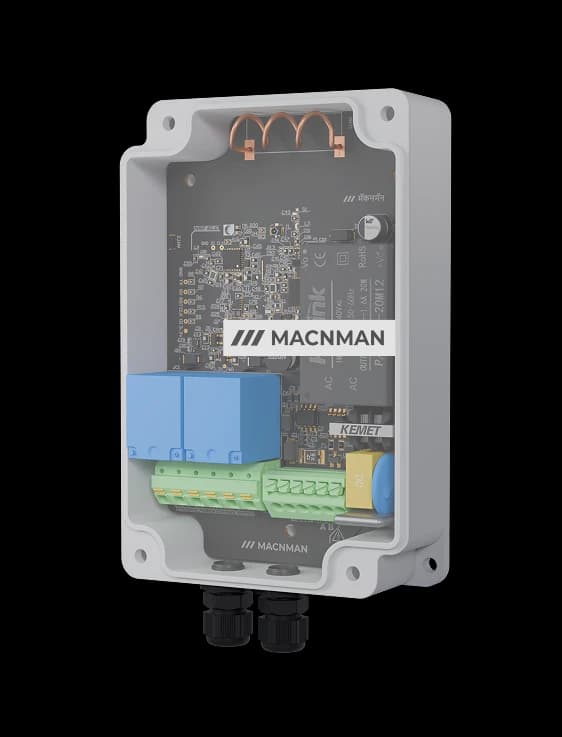

Industrial RS485 Modbus to Wi-Fi Converter

Modbus RTU to MQTT Gateway & Datalogger for Your Existing Wi-Fi

Industrial RS485 Modbus to Wi-Fi Converter

MacSync WX1 polls your Modbus RTU meters, PLCs and drives over RS485 and publishes the values to any MQTT broker

No Gateway, No SIM, No New Cable —
Just the Wi-Fi You Already Have.

Modbus RTU MasterRS485 · function codes 03 and 04
MQTT & HTTPSTLS on port 8883
Dual-Band Wi-Fi 62.4 & 5 GHz · WPA2 / WPA3
30,000 RecordsStore-and-forward in outages
Battery or 9–36 V DC19 Ah cell · IP65

MacSync WX1

Explore the highlights

Modbus RTU master polling RS485 devices

Polls holding and input registers from 20 to 32 slave devices on one RS485 line, on its own schedule.

In plain terms

What Is a Modbus to MQTT Converter?

A Modbus to MQTT converter is a device that acts as a Modbus RTU master on an RS485 line, polls the registers of existing equipment such as energy meters, PLCs and drives, and publishes the values as messages to an MQTT broker over the network. This one uses the Wi-Fi your site already has, so there is no gateway to install, no SIM and no new cable back to a control room.

It is often searched for as an RS485 to Wi-Fi converter or a Modbus Wi-Fi gateway, but it is worth separating from a serial server. A serial server passes raw serial bytes across the network and still needs a SCADA or PLC master to poll through it. The MacSync WX1 does the polling itself, on its own schedule, and delivers finished values to your broker, cloud platform or on-premise server over MQTT or HTTPS. If the Wi-Fi or the server goes down it stores up to 30,000 records and forwards them when the link returns.

Modbus role
Modbus RTU master on one RS485 port, reading holding and input registers from 20 to 32 slave devices on the line.
Publishes to
Any MQTT broker, plus HTTP and HTTPS endpoints — on-premise, private cloud, AWS IoT Core or Azure IoT Hub.
Wi-Fi
Wi-Fi 6 (IEEE 802.11 b/g/n/ac/ax), dual-band 2.4 GHz and 5 GHz, WPA2-PSK and WPA3, DHCP or static IP.
Security
TLS-encrypted MQTT on port 8883, with server certificate validation and username and password authentication. Client certificates are a firmware option on orders of 1,000 devices.
Outage handling
Store-and-forward buffering of 30,000 records through Wi-Fi or server outages.
Power
Battery variant on a 19 Ah cell, estimated at about 2.5 years on 15-minute uploads, or a 9–36 V DC variant, in an IP65 enclosure with an IP67 option.

Two devices, one search term

RS485 to Wi-Fi Converter: Modbus to MQTT Gateway or Serial Server?

Both get sold as an "RS485 to Wi-Fi converter", and they do opposite jobs. Picking the wrong one is the most common mistake in this category, so here is the difference.

CompareModbus to MQTT converter — MacSync WX1RS485 to Wi-Fi serial server
What it doesPolls Modbus registers itself and publishes the valuesPasses raw serial bytes across the network unchanged
Who is the Modbus masterThe converterYour SCADA, PLC or PC software
What arrives at the other endNamed values on an MQTT topic or HTTPS endpointA Modbus RTU or Modbus TCP stream on a network port
Needs a master polling itNo — it reports on its own scheduleYes — the master must stay connected and keep polling
If the Wi-Fi dropsStores up to 30,000 records and forwards them laterPolls time out and that period's data is lost
Typical power19 Ah battery or 9–36 V DCDC supply only
Choose it forDashboards, MQTT brokers, energy analytics, cloud and on-premise platformsAn existing SCADA or HMI that already speaks Modbus TCP

If you need a virtual COM port or a Modbus TCP connection for an existing SCADA master, a serial server is the right tool and the MacSync WX1 is not. If you want readings delivered to a broker or platform without building a polling application, this is the device.

Downloads

Everything You Need to Get Building

Datasheets, drawings, firmware, and tools — all in one place.

Datasheet — Battery Variant (WX1-BO)

Full technical specifications

Datasheet — Powered Variant (WX1-PO)

Full technical specifications

MQTT Configuration Guide

Broker, TLS and topic setup

RS485 Modbus Configuration Guide

Register mapping in the Maya app

Engineered for

Built for the Plant Floor, Not the Server Rack

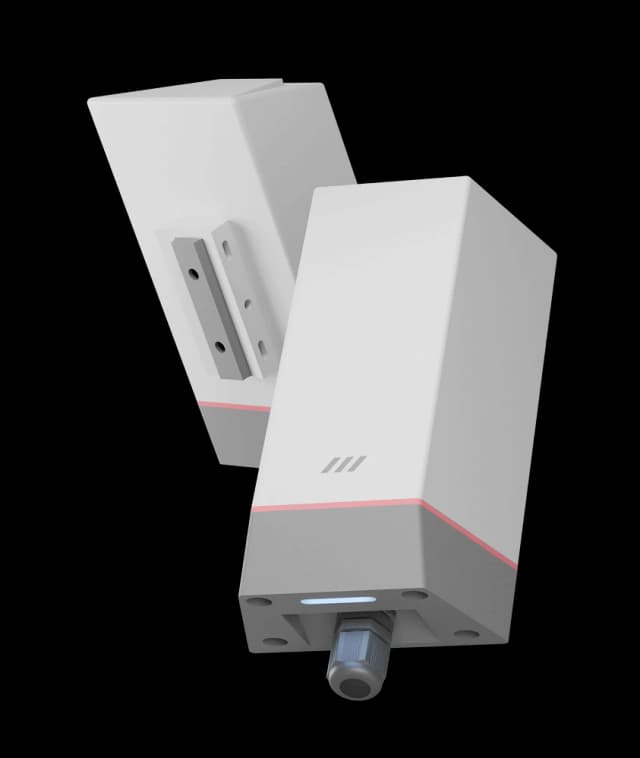
A sealed glass-filled nylon enclosure rated IP65, with an IP67 option, for mounting beside the equipment rather than inside a panel.

IP65 enclosure

Applications

Factory Energy Sub-Metering — IoT solution by Macnman

Factory Energy Sub-Metering

Energy MetersExisting Wi-Fi

Read Modbus energy meters on every feeder and publish kWh, demand and power factor to your dashboard over the plant Wi-Fi, with no cable back to the panel room.

Read case studies

Browse all 13 applications

01 / 13

Works with

Modbus RTU to MQTT, Without a Gateway or a Polling Application

A Modbus master that polls your equipment and publishes straight to your broker over the Wi-Fi you already run.

A Modbus master that polls your equipment and publishes straight to your broker over the Wi-Fi you already run.

Where it fits

From Meter Rooms to Machine Halls, Wherever Wi-Fi Already Reaches

Energy meters connected over Wi-Fi

Energy & Utility Metering

Modbus energy, water and gas meters published to a dashboard or billing system, feeder by feeder and tenant by tenant.

Plant equipment monitored over Wi-Fi

Plant Equipment & Machines

PLCs, drives, compressors and generator controllers read over RS485 without changing a line of control code.

Building plant room monitored over Wi-Fi

Buildings & Cold Storage

Chillers, AHUs, BTU meters and refrigeration controllers brought into one platform, using the building's own network.

Want to see Modbus data arriving on your broker?

Book Live Demo

Why Macnman

Do You Need a Gateway to Send Modbus Data over Wi-Fi?

No. The MacSync WX1 joins your existing Wi-Fi as an ordinary client and connects to the broker directly, so there is no gateway, hub or SIM between the meter and your platform. It polls the Modbus registers itself, publishes the values over MQTT or HTTPS, and buffers up to 30,000 records if the network or the server is unavailable.

Do You Need a Gateway to Send Modbus Data over Wi-Fi? — configuration and management with the Maya app

Free planning tools

Size your deployment before you order the hardware

Free engineering calculators for coverage, range and battery life — built on measurements from our own deployments rather than textbook models, which is why the answers tend to be smaller and a good deal more useful. Nothing here quotes a range we have not actually achieved.

Open the calculatorsCoverage & capacity ·Battery life ·Antenna height

No sign-up, no email, nothing to install. More on the way for Wi-Fi and BLE.

Hardware

IP65 Enclosure for the Plant Floor, Battery or DC Powered

The MacSync WX1 is housed in glass-filled nylon rated IP65, with an IP67 option, and operates from −40 °C to +80 °C, so it mounts beside the equipment rather than inside a panel. The battery variant runs on a 19 Ah industrial cell where there is Wi-Fi but no spare supply; the powered variant takes 9–36 V DC for continuous reporting.

IP65 Enclosure for the Plant Floor, Battery or DC Powered illustration

Battery life

How Long Does the Battery Last on Wi-Fi?

It depends almost entirely on how often the converter connects. These are estimates from the model behind the Macnman Wi-Fi battery life calculator, for the battery variant on its 19 Ah cell with one Modbus read and one TLS connection per upload.

Upload intervalDHCP addressStatic IP address
Every 5 minutesAbout 0.9 yearsAbout 1.4 years
Every 10 minutesAbout 1.7 yearsAbout 2.5 years
Every 15 minutesAbout 2.5 yearsAbout 3.5 years
Every 30 minutesAbout 4.3 yearsAbout 5.7 years
Every hourAbout 6.7 yearsAbout 8.2 years
5-minute readings, uploaded hourly (sampling mode)About 5.0 yearsAbout 5.8 years

Estimated, not guaranteed: a sensor powered from the converter and a weak Wi-Fi signal both shorten battery life. Sampling mode stores readings and sends them together, so the converter pays for one Wi-Fi connection instead of twelve. For reporting faster than every few minutes, use the 9–36 V DC variant. Try your own settings in the Wi-Fi battery life calculator under Network Planning Tools.

Ready to put your Modbus equipment online? MacSync makes it effortless.

At a glance

MacSync WX1 — Key Specifications

Macnman MacSync WX1 RS485 Modbus to Wi-Fi MQTT converter

RTU master

Modbus

1 × RS485 · 20 to 32 devices

MQTT · HTTPS

Protocols

TLS / SSL encrypted

Wi-Fi 6

Wi-Fi

dual-band 2.4 & 5 GHz · 802.11ax

30,000

Onboard memory

records, store-and-forward

19 Ah

Power

battery, or 9–36 V DC

IP65

Ingress

IP67 optional variant

Features

Everything Built into One Modbus to Wi-Fi Converter

Threshold Alerts

Two triggers publish immediately when a value leaves its limits.

Collects several readings and sends them as one upload to save power.

Works on Your Existing Wi-Fi

No gateway, no hub and no SIM. The converter joins the 2.4 or 5 GHz network already on site, Wi-Fi 6 included.

Modbus RTU Master

Polls holding and input registers from 20 to 32 slave devices on one RS485 line.

Battery or 9–36 V DC

A 19 Ah cell where there is no supply, or DC power for continuous high-rate reporting.

TLS-Secured MQTT

Encrypted on port 8883 with server certificate validation, plus WPA2-PSK and WPA3 on the Wi-Fi side.

30,000 Records On-Board

Built-in memory keeps logging through Wi-Fi and server outages, then forwards the backlog.

Analog Inputs Included

Two 4–20 mA, two 0–10 V and two digital inputs, used in place of RS485 when needed.

Any Broker, Any Platform

MQTT, HTTP and HTTPS to on-premise servers, private cloud, AWS IoT Core or Azure IoT Hub.

Capabilities

On-Board Memory That Never Loses a Reading

Built-in memory stores 30,000 records through a Wi-Fi or server outage and forwards them automatically when the connection returns.

Built-in memory stores 30,000 records through a Wi-Fi or server outage and forwards them automatically when the connection returns. device feature illustration (mobile view)

Not sure which wireless technology suits your site?

Compare

Architecture

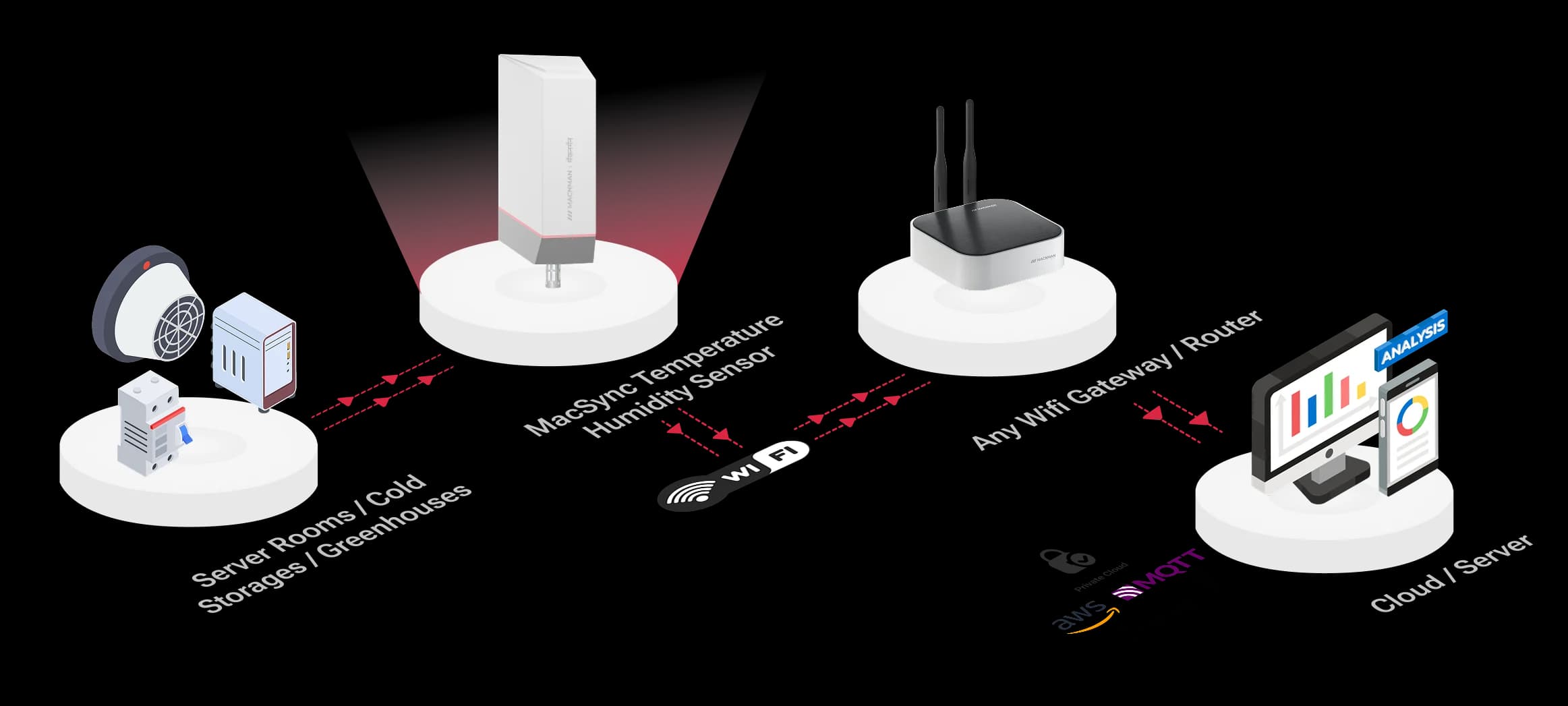
Modbus to MQTT over Wi-Fi — Network Architecture

Modbus to MQTT over Wi-Fi — Network Architecture IoT architecture diagram (mobile view)

Why it matters

Most plants have years of Modbus equipment and good Wi-Fi, with nothing connecting the two. This closes that gap without a gateway or a rewiring job.

No new infrastructure

It joins the Wi-Fi you already run. There is no gateway to site, no SIM to manage and no cable to pull back to the control room.

Data in the form you want

Finished values arrive on an MQTT topic or HTTPS endpoint, ready for a dashboard, historian or analytics tool.

Keeps IT comfortable

TLS encryption, outbound-only connections and a broker of your choosing, including one that never leaves the site.

Gaps do not become holes

A Wi-Fi dropout or a server restart is buffered on the device and forwarded later, so the history stays complete.

How it works

How Does a Modbus to MQTT Converter Work?

Step 1 of 5

Wire RS485 to the equipment

Two wires, A and B, from the meter, PLC or drive to the converter. 20 to 32 devices can share the line, each with its own slave ID.

What lands on your broker

What Does the Converter Publish to Your MQTT Broker?

Integrators ask this first, so here it is. The converter publishes each set of readings to the topic you choose and listens on a second topic for commands. Field names are the parameter names you give each register in the Maya app.

Reading — published to macsync/device001/data

{
  "deviceId": "device001",
  "timestamp": "2026-01-15T10:15:00Z",
  "Energy_Meter_KW": 42.7,
  "Voltage_L1": 231.4,
  "Current_L1": 61.8,
  "Frequency_Hz": 49.98
}

Example message: one value per configured Modbus field, under the name you gave it.

Command — sent to macsync/device001/cmd

{
  "slaveId": 1,
  "numberofreg": 1,
  "address": 0,
  "value": 223
}

Writes the value 223 to register 0 on slave 1. Coil writes and one-time register reads use the same topic.

The reading is an illustrative example: topics and field names are yours to set. The command format is the one in the remote configuration guide. Ask us for the current payload reference before writing a parser.

Choosing a network

Wi-Fi or LoRaWAN for Your Modbus Data?

Macnman builds this converter for both networks, so the honest answer depends on where the equipment sits and how much data you need from it.

CompareMacSync WX1 — Wi-FiMacSync LX1 — LoRaWAN
Network it needsThe Wi-Fi already on siteA LoRaWAN gateway
ReachUp to about 100 m indoors from an access pointKilometres from a gateway
Data per messageFull messages — many registers at once51 to 222 bytes per uplink
Route to your platformDirect, over MQTT or HTTPSThrough a LoRaWAN network server
Remote writesCommands arrive on an MQTT topicDownlinks wait for the next uplink in Class A
Choose it whenEquipment is inside Wi-Fi coverage and you want rich or frequent dataEquipment is spread across a large site or beyond Wi-Fi reach

Inside a plant, building or campus with good Wi-Fi, the WX1 is simpler: no gateway and no network server. Across a wide site, outdoors, or where Wi-Fi does not reach, the LoRaWAN version covers the distance with one gateway.

MacSync WX1 reporting modes

Reporting

Three Ways to Report, Chosen by What You Are Watching For.

A reading published on a fixed interval. Predictable data for trends, billing and energy reports.

Note: Shorter intervals suit the DC-powered variant.

Cloud & LNS

Publishes to Any MQTT Broker or HTTPS Endpoint

On-Premise, Private Cloud, AWS IoT Core & Azure IoT Hub

MacSync WX1 converters publish Modbus values to any standard MQTT broker or HTTPS endpoint — a server on your own network, a private cloud, AWS IoT Core or Azure IoT Hub — with TLS encryption and no vendor platform in between.

Industrial IoT device data integration illustration
Cloud platforms and LoRaWAN network servers supported

Installation

On the network in minutes, with nothing new to install.

0.1Four steps to live Modbus data
1
Wiring RS485 to the MacSync WX1

Mount and wire

Fix the unit to a wall or pole near the equipment and connect RS485 A to A and B to B.

2
Mapping Modbus registers in the Maya app

Map the registers

Add each field in the Maya app and press Check to confirm the value against the meter's display.

3
Entering MQTT broker settings

Join Wi-Fi and the broker

Select the network, enter the MQTT host, port and topics, and enable TLS for an encrypted connection.

4
Testing Wi-Fi signal and MQTT delivery

Test before you leave

Send Uplink checks connectivity, reports Wi-Fi signal strength and confirms the message reached the broker.

Range & reliability

Reliable Wi-Fi Connectivity, Built for Industrial Sites

Dependable 2.4 / 5 GHz Wi-Fi with 30,000-record on-board buffering through outages

The MacSync WX1 is a dual-band Wi-Fi 6 device that works on both 2.4 GHz and 5 GHz, reaching up to about 100 m indoors from an access point depending on the building. The Maya app reports signal strength at the mounting point before you commit, and anything missed during a dropout is stored and forwarded.

MacSync WX1 Wi-Fi connectivity across an industrial site

FAQ

Frequently asked questions

Wire the equipment's RS485 A and B terminals to the MacSync WX1, then open the Maya app over Bluetooth. Add each value as a field: slave ID, function code, register address, data type and how many registers to read. Join the device to your Wi-Fi, enter the broker's host and port, and set a publish topic such as macsync/device001/data. From then on the converter polls the registers on its own schedule and publishes the values to that topic. The Check button shows a live reading for each field, so the register map can be verified before you leave site.

Each upload is published to the topic you set, for example macsync/device001/data, and carries the values of the fields you configured under the parameter names you gave them in the Maya app, such as Energy_Meter_KW. Commands travel the other way as JSON on the subscribe topic: a message with the slave ID, register address and value writes a register on the connected equipment. The sample on this page shows an example of both; ask us for the current payload reference before you write a parser.

No, and the difference matters. A serial server is a transparent bridge: it passes raw serial bytes across the network and relies on a SCADA or PLC master to do the polling through it. The MacSync WX1 is the Modbus master itself. It polls your equipment, converts the registers into values and publishes them to a broker or HTTPS endpoint. If you need a virtual COM port or Modbus TCP for an existing SCADA system, buy a serial server. If you want data delivered to a platform without writing a polling application, this is the right device.

MQTT always runs through a broker, and the MacSync WX1 works with any standard one, such as Mosquitto, EMQX or HiveMQ, whether it runs in your own server room or in the cloud. You enter a hostname or an IP address, so a local broker on the plant network works exactly like a hosted one. The datasheet also lists AWS IoT Core, Microsoft Azure IoT Hub and Google Cloud, alongside on-premise servers, private cloud, REST APIs, webhooks, SCADA and BMS platforms. Where there is no broker, the device can post to an HTTP or HTTPS endpoint instead. The standard firmware signs in with a username and password, so a platform that expects a client certificate on every device, as AWS IoT Core does by default, needs the client-certificate firmware option, which is offered on orders of 1,000 devices or more.

Yes. Turn on TLS in the MQTT settings and use port 8883 for an encrypted connection, with a toggle to validate the broker's server certificate. Plain MQTT on port 1883 remains available for a closed local network. In the standard firmware, authentication is by username and password. Client-certificate authentication (mutual TLS) and a change to the MQTT QoS level are firmware customisations, available on orders of 1,000 devices or more. On the Wi-Fi side the device supports WPA2-PSK and WPA3, and firmware is protected by secure boot and signed over-the-air updates. The converter only makes outbound connections to your broker, so no inbound ports need opening on the plant firewall.

Yes, as a firmware customisation. The standard MacSync WX1 firmware signs in with a username and password over TLS and validates the broker's server certificate. If your platform needs a client certificate on each device (mutual TLS), or a specific MQTT QoS level, we build that into the firmware for orders of 1,000 devices or more. Tell us the broker and its authentication requirements when you enquire.

Nothing is lost. The MacSync WX1 keeps polling the Modbus equipment and stores the readings in onboard memory, up to 30,000 records, then forwards them once the connection returns. At one record every five minutes that is roughly 100 days of cover. That store-and-forward behaviour is one of the practical differences from a transparent serial server, where a dropped link simply means the master's polls time out and that period is missing from your history.

Yes to both. The MacSync WX1 is dual-band and supports Wi-Fi 6 (IEEE 802.11ax) as well as the older 802.11 b/g/n/ac standards, so it joins Wi-Fi 4, Wi-Fi 5 and Wi-Fi 6 access points, where many low-cost RS485 to Wi-Fi converters are 2.4 GHz only. In a plant, 2.4 GHz usually reaches further and passes through walls and machinery better, while 5 GHz has more clean channels where access points are close by. On a Wi-Fi 6 access point the battery variant can also use Target Wake Time to cut idle power. The Maya app scans for networks and shows signal strength for each, and a hidden network can be added manually with the band chosen explicitly.

The supported security modes are WPA2-PSK and WPA3, with DHCP or a static IP address. If your corporate network uses 802.1X enterprise authentication with per-user certificates, ask us before ordering. In practice most IT teams place devices like this on a separate IoT network or VLAN with its own passphrase, which also keeps plant-floor equipment away from office systems. The converter needs only an outbound connection to the broker.

For scheduled polling, function code 03 (Read Holding Registers) and 04 (Read Input Registers). Values can be read as INT16, UINT16, INT32 or FLOAT32, with either word order for the 32-bit types, and several consecutive registers can be read as one group. Each field has its own slave ID, so one RS485 line can carry multiple devices. Serial settings cover the common baud rates up to 115200 bps with none, even or odd parity.

Yes. The converter subscribes to a command topic, and a JSON message containing the slave ID, register address and value writes a register on the connected equipment. Coils can be written the same way, and a one-time read of any register can be requested on demand. Because the device holds an MQTT connection rather than waiting for a radio window, commands reach a powered unit promptly. On the battery variant, commands are picked up when the device next wakes.

It can, and the upload interval decides how many. A Wi-Fi connection costs far more energy than a LoRaWAN transmission, so the MacSync WX1-BO sleeps at around 100 µA between readings, wakes briefly to poll and transmit, and goes back to sleep. On the 19 Ah cell, the Macnman Wi-Fi battery life calculator estimates about 0.9 years at 5-minute uploads, 2.5 years at 15 minutes, 4.3 years at 30 minutes and 6.7 years at hourly uploads, with DHCP, a TLS connection and one Modbus read each time. A static IP shortens every connection and raises those figures to about 3.5 years at 15 minutes and 8.2 years hourly. Sampling mode helps more: reading every 5 minutes but uploading the 12 readings once an hour gives about 5 years. The device also supports Wi-Fi Power Save Mode on any access point and Target Wake Time on Wi-Fi 6 access points. These are estimates; a sensor powered from the converter and a weak Wi-Fi signal both shorten them. For reporting every few seconds, choose the 9–36 V DC variant, and where battery life matters most, the LoRaWAN version of this converter lasts longer on the same cell.

No. The converter joins your existing Wi-Fi as an ordinary client and talks to the broker directly. There is no gateway or hub to buy, no SIM and no monthly data plan per device. That makes it the simplest option wherever the equipment already sits inside Wi-Fi coverage.

Yes. The broker can be a machine on your local network, entered by IP address, so readings never have to leave the site. The device supports on-premise servers and private cloud as well as public platforms, which suits plants that need local data ownership or have no outbound internet access from the production network.

Choose Wi-Fi when the equipment is inside reliable Wi-Fi coverage and you want frequent or detailed data: there is no gateway, messages can carry many registers at once, and commands arrive quickly. Choose LoRaWAN when the equipment is spread across a large site, outdoors, or beyond the reach of your access points: one gateway covers kilometres, at the cost of smaller messages and slower updates. Macnman builds the converter for both, as the MacSync WX1 for Wi-Fi and the MacSync LX1 for LoRaWAN.

Yes, with one limit you should know about. The MacSync WX1 has two 4–20 mA inputs, two 0–10 V inputs and two digital inputs with 12-bit resolution, but the RS485 and analog inputs share the same channels, so the device runs in either RS485 mode or analog mode, not both at once. A site with a Modbus meter and an analog transmitter side by side needs two units, or a transmitter with a Modbus output.

From an Android phone, using the Maya app over Bluetooth, with no programming and no web interface to find. The app scans for Wi-Fi networks, takes the MQTT settings and the Modbus field list, and has a Send Uplink test that checks network connectivity, measures Wi-Fi signal strength and confirms that a message reached the broker. Settings can be changed later from the server by sending JSON commands.

Yes. Macnman Technologies designs and manufactures the MacSync WX1 in Pune, Maharashtra. It is WPC compliant and conforms to the RoHS directive, and support comes directly from the engineering team in Indian Standard Time.

Modbus RTU and Modbus TCP are the same request-and-response protocol on different wires: a master asks and a slave answers, over RS485 for RTU or over a network for TCP. MQTT works differently. A device publishes a message to a broker whenever it has data, and any number of applications can subscribe to it. Converting RTU to TCP only changes the cable, and something still has to keep polling. Converting RTU to MQTT changes who starts the conversation and where the data can go, which is why it suits dashboards and cloud platforms.

One RS485 line carries 20 to 32 Modbus devices, 32 being the standard RS485 limit without a repeater. Each value you configure carries its own slave ID, in the Modbus range of 1 to 247, and a single read can cover up to 125 consecutive registers. All devices on the line must share the same baud rate and parity. Send us your device list and register map and we will confirm the configuration.

Six things. The device joins Wi-Fi as an ordinary client using WPA2-PSK or WPA3, on 2.4 or 5 GHz. It takes an address by DHCP or a static IP. It makes one outbound connection to the broker, on port 8883 for TLS or 1883 for plain MQTT, so no inbound port or port-forward is needed. Traffic can be encrypted with TLS and the broker's certificate validated. It signs in to the broker with a username and password; client-certificate authentication is a firmware option on orders of 1,000 devices or more. And the broker can sit inside your own network, so no data has to leave the site. Most IT teams place it on a separate IoT network or VLAN.

Got an IoT idea?

Let’s bring it to life!

flag image

Let‘s Make it Easy

Reach Out Now

Icon

Contact to Sales

Talk to our friendly team

chat@macnman.com
Icon

Call Us

24 X 7 Always On

+91 7972856163
Icon

Contact to Support

We are here to help

support@macnman.com
Icon

Visit Us

Visit our office HQ

View on Google Map

Socials

LoRaWAN

4G IoT

WiFi Ble IoT

Nb IoT

Customize

Maya

Documentation

Case Studies

Blogs

Terms and Conditions

Welcome to Macnman Technologies Pvt Ltd! These Terms and Conditions ("Terms") govern your access to and use of the Macnman's website (the "Website"). As an Original Equipment Manufacturer (OEM) of IoT products and solutions, this Website is designed primarily to provide information to potential business partners, integrators, and clients. By accessing or using our Website, you acknowledge that you have read, understood, and agree to be bound by these Terms. If you do not agree to these Terms, please do not use our Website.

1. Acceptance of Terms

By using our Website, you confirm that you are authorized to enter into a binding contract on behalf of your business or entity (if applicable) and that you accept these Terms. These Terms constitute a legally binding agreement between you and Macnman IoT regarding your use of the Website.

2. Website Content & Intellectual Property

Ownership: All content on this Website, including but not limited to text, graphics, logos, images, audio clips, video clips, data compilations, software, product descriptions, and technical information (collectively, "Content"), is the property of Macnman IoT or its licensors and is protected by Indian and international copyright, trademark, and other intellectual property laws.

Informational & Marketing Purpose: All Content, including images, videos, illustrations, graphical representations, and textual descriptions of products and solutions, is provided for general informational, illustrative, and marketing purposes only. While we strive to present accurate and up-to-date information, this Content is intended to convey the general features, capabilities, and potential applications of our IoT products.

No Warranty from Website Content: The Content on this Website does not constitute a definitive specification, technical guarantee, or warranty for any specific product or solution. Actual product specifications, performance, features, and appearance are subject to change and are exclusively defined in official product datasheets, technical documentation, and specific commercial agreements (e.g., purchase orders, supply contracts) between Macnman IoT and its clients. You acknowledge that relying solely on Website Content for product suitability or performance is at your own risk.

Limited License: You are granted a limited, non-exclusive, non-transferable, revocable license to access and use the Website and its Content for your internal business informational purposes, such as evaluating potential OEM partnerships or product integration. You may not reproduce, distribute, modify, create derivative works of, publicly display, publicly perform, republish, download, store, or transmit any of the Content without the prior written consent of Macnman IoT.

3. Use of Website

You agree to use the Website only for lawful purposes consistent with its intended B2B/OEM informational nature and in a manner that does not infringe the rights of, or restrict or inhibit the use and enjoyment of this Website by any third party. Prohibited conduct includes, but is not limited to: Engaging in any activity that could harm, disable, overburden, or impair the Website or the servers and networks connected to the Website. Attempting to gain unauthorized access to any portion of the Website, other accounts, computer systems, or networks connected to the Website through hacking, password mining, or any other means. Using the Website to distribute any malicious software, viruses, or other harmful content. Collecting or storing personal data about other users or any commercial information without their express consent. Using the Website for direct sales or marketing of third-party products or services without explicit authorization.

4. Disclaimers

"As Is" and "As Available" Basis: The Website and all Content are provided on an "as is" and "as available" basis, without any warranties of any kind, either express or implied.
No Warranties of Performance or Suitability: Macnman IoT does not warrant that the Website or its Content will be error-free, uninterrupted, secure, or available at any particular time or location.
Product Development: Products and solutions mentioned on the Website may be under development or subject to change. At Macnman Technologies Pvt. Ltd. ("Macnman"), we take pride in our field success and may highlight it via case studies, client stories, and marketing materials. Unless otherwise agreed in writing, we consider ourselves to have full rights to share such information.

5. Limitation of Liability

To the fullest extent permitted by applicable law, in no event shall Macnman IoT, its affiliates, directors, officers, employees, agents, or suppliers be liable for any direct, indirect, incidental, special, consequential, punitive, or exemplary damages, including but not limited to, loss of profits, goodwill, data, or other intangible losses arising out of or in connection with your use of the Website or its Content.

6. Indemnification

You agree to defend, indemnify, and hold harmless Macnman IoT and all related entities from any claims, liabilities, damages, losses, or expenses arising from your violation of these Terms or your misuse of the Website.

7. Links to Third-Party Websites

The Website may contain links to third-party websites. We do not control or take responsibility for the content, privacy policies, or practices of any third-party websites. Inclusion of links does not imply endorsement.

8. Governing Law & Jurisdiction

These Terms shall be governed by Indian law. Any disputes shall be subject to the exclusive jurisdiction of the courts located in Pune, Maharashtra.

9. Changes to Terms

We reserve the right to update these Terms at any time. Continued use of the Website after changes have been posted constitutes acceptance of the new Terms. You should review these Terms regularly.

10. Returns & Replacement

Macnman Technologies Pvt Ltd accepts returns with a 100% payment refund within 7 days of delivery, provided the product is returned in its original condition with all accessories and packaging intact. No returns or refunds will be accepted after 7 days from the date of delivery if the product is found to be functional and free from manufacturing defects.

11. Warranty Policy

All Macnman IoT products are covered under a standard 12-month limited warranty from the date of delivery, against manufacturing defects only. The warranty does not cover damage caused by improper installation, mishandling, unauthorized modification, or operation outside the product’s specified conditions. Warranty claims will be processed only after product evaluation by Macnman’s technical team.

12. Product Modifications

Macnman Technologies Pvt Ltd reserves the right to modify the design, specifications, components, or features of its products without prior notice, in line with continuous improvement and technological upgrades.

13. Shipping & Delivery

All products are shipped through reliable courier or logistics partners. Macnman shall not be liable for any delay or damage occurring during transit once the shipment has been handed over to the carrier. Customers are advised to inspect packaging and report any visible damages immediately upon delivery.

14. Force Majeure

Macnman Technologies Pvt Ltd shall not be held responsible for any failure or delay in performance resulting from events beyond its reasonable control, including but not limited to natural disasters, war, strikes, government actions, network outages, or component shortages.

15. Limitation of Use

Macnman IoT products are designed for commercial and industrial use. They are not intended for life-support, safety-critical, or mission-critical systems where failure could lead to personal injury, death, or environmental harm. Customers assume all responsibility for use in such applications.

16. Confidentiality

Any non-public technical, business, or proprietary information shared between Macnman and its customers shall be treated as confidential and shall not be disclosed to third parties without prior written consent, except as required by law.

17. Export Compliance

Customers agree to comply with all applicable export control laws and regulations when purchasing or using Macnman products, including restrictions related to international transfers, re-exports, or use in sanctioned regions.

18. Dispute Resolution

In the event of any dispute arising out of or related to these Terms or any transaction with Macnman Technologies Pvt Ltd, both parties shall attempt to resolve the matter amicably through discussion. If unresolved, the dispute shall be subject to arbitration in Pune, Maharashtra, under the Arbitration and Conciliation Act, 1996, and governed by Indian law.