
RS485/Analog Datalogger (MacSync) How to Set Triggers
RS485/Aalog Datalogger How to Set Triggers? — You can configure the device to automatically send an uplink when a specific sensor value crosses a defined…
Settings Triggers
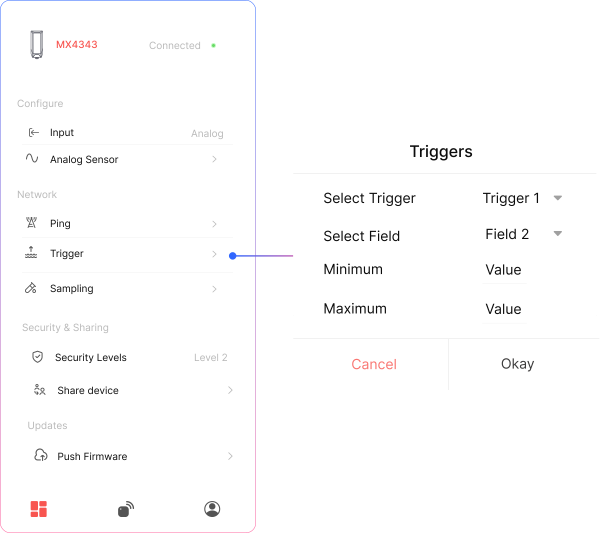
You can configure the device to automatically send an uplink when a specific sensor value crosses a defined threshold.
- Select Trigger 1 or Trigger 2 from the dropdown.
- Choose the field number (sensor/data field) to monitor.
- Set the minimum and maximum threshold values.
- The device will send an uplink whenever the selected field value goes outside the defined range.
Related Resources
- Datasheet: MacSync LX1 RS485 Modbus RTU and analog to LoRaWAN datalogger datasheet
- Start of this manual: RS485/Analog Datalogger (MacSync) Introduction
- Help: Contact Macnman support