
RS485/Analog Datalogger (MacSync) LoRaWAN Network Health
Check MacSync datalogger LoRaWAN network health in the Maya app: run a network test and read uplink status, spreading factor, SNR and RSSI.
LoRaWAN Network Test
How to check LoRaWAN Network Health in Macsync ? (Video Demo) :
Step-by-Step Configuration Guide :
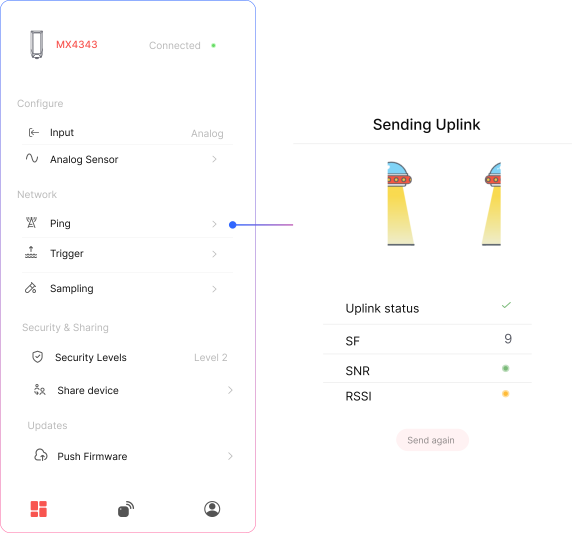
When you press Send Uplink, the device performs:
- A server connectivity check
- A basic RF analysis
- Sends a confirmed uplink (expects acknowledgment from the server)
Uplink Status
✅ Successful Uplink – Device received acknowledgment from the server
❌ Failed Uplink – No acknowledgment received
Spreading Factor (SF)
Defines the trade-off between range and data rate.
Valid range: SF7 (short range, fast) to SF12 (long range, slow)
SNR – Signal-to-Noise Ratio
Measures signal clarity.
- Good:
0 to +10 dB - Acceptable:
-10 to 0 dB - Poor:
-20 to -10 dB
Note: Higher SNR = cleaner signal
RSSI – Received Signal Strength Indicator
Measures signal power in dBm (always negative):
- Excellent:
-30 to -50 dBm - Good:
-51 to -90 dBm - Weak:
-91 to -120 dBm - Very Weak:
< -120 dBm
Note: Closer to 0 = stronger signal
s
Related Resources
- Datasheet: MacSync LX1 RS485 Modbus RTU and analog to LoRaWAN datalogger datasheet
- Start of this manual: RS485/Analog Datalogger (MacSync) Introduction
- Help: Contact Macnman support