
LoRaWAN® Controller (MacSet) Security & Device Sharing
LoRaWAN® Controller Security & device sharing — Control who can access and configure the device via the Maya app by selecting a security level:
Choosing Security Levels
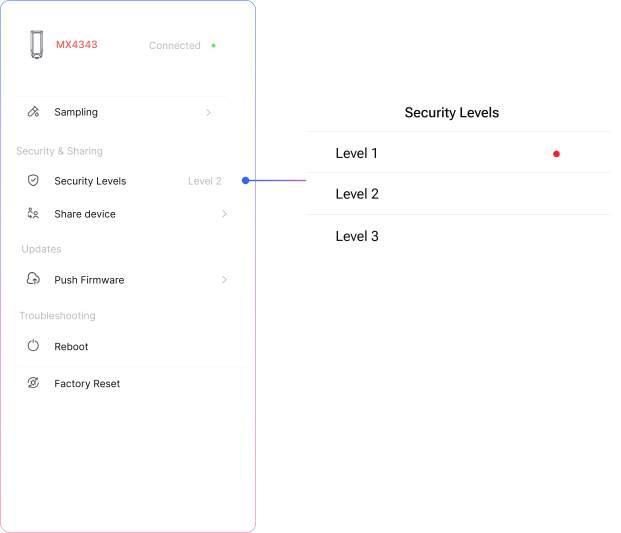
Security Levels
Control who can access and configure the device via the Maya app by selecting a security level:
-
Level 1 – Open Access
The device is accessible to any Maya app user nearby. -
Level 2 – Shared Access
The device is accessible only to the owner and to users it has been explicitly shared with. -
Level 3 – Owner Only
The device is restricted to the registered owner only. No sharing allowed.
Choose the appropriate level based on your deployment security needs.
Device Sharing
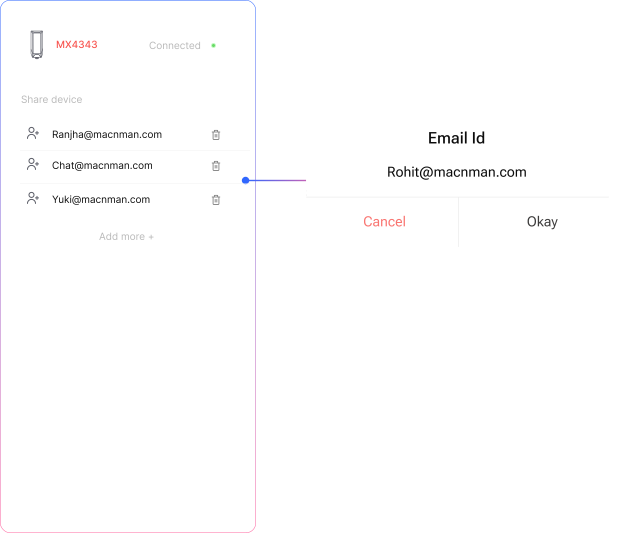
Manage access to your devices securely through the Maya app.
-
Device Sharing
Manage access to your devices securely through the Maya app. -
Share Device
To share a device with your peers, simply add their email IDs to the sharing list. They will then be able to access the device from their own Maya app. -
Revoke Access
To remove access, click the delete icon next to the user you want to revoke. -
Add More
Click “Add More” to include additional peers.You can share a device with up to 5 users at a time.
Related Resources
- Datasheet: MacSet LX1 industrial LoRaWAN relay controller datasheet
- Datasheet: MacSet LX2 industrial LoRaWAN multi-IO controller datasheet
- Start of this manual: LoRaWAN® Controller (MacSet) Introduction
- Help: Contact Macnman support